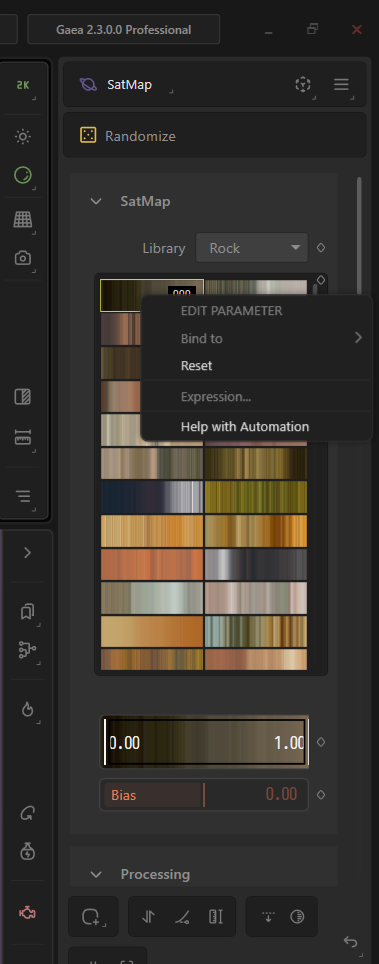
I haven’t found a way to bind the full SatMap controls for the Houdini Terrain Processor. As of right now (Gaea 2.3.0.0 Pro)only the library selector is bindable. Is there a way to properly expose the Synth node (as a ramp generator for Houdini)? I also think Gaea’s Splat nodes should be usable in Houdini to support game dev baking workflows too.
Will there be a way also to save a satmap preset in a custom library?
Are there plans to fix or update this soon, given how nice it is to have the SatMap workflow directly inside of Houdini?
Additionally, could a general overview video (similar to the Terrain Processor introduction) or official documentation be created for these nodes in relation to the Houdini workflow? If possible, the color-related nodes (clt, sa, spc, sy, ti, wc) would be incredibly useful inside the Terrain Processor, as I assume the Colorize category is intended for use there, just like other Gaea nodes in the general Houdini pipeline.
If full documentation isn’t possible right now, could a roadmap, compatibility spreadsheet, or a single documentation page regarding Gaea nodes and their current limitations with the Terrain Processor bridge be created instead?
I have moved this post to the Houdini section for better visibility.
Regarding docs I’ll look into Houdini workflows more, I personally don’t use it so the docs will be thinner there compared to many recent efforts. The baseline needs to get it connected and running are there however.
There are quite a few potentially useful sections for you that dig into as well.
Houdini, gaea2houdini, exposing vars, scripting and expressions of the docs.
[!important]
Some nodes do have custom UI so they’re not going to be able to be exposed in the same manner, CLUTer for example would be one.
I believe /satmaps can be used but you have to call the map numbers as an array, no custom UI gets sent into Houdini or any other supported pipeline.
Since the satmap already exposes “library” values 1–4 in the Houdini terrain processor, why not also expose those colorsets (“100/101/102”) just as a number parameter? No thumbnails required.
But I think for now, I’ll try to create a macro selector as you suggested.
I get what you’re saying, but perhaps I’m missing something or just being slow lol: how can I automate this macro if the specific parameter I need to control is completely non-bindable? Neither the Houdini terrain processor nor your suggested macro solution (macroports) seems possible if I can’t bind that parameter to a SatMap library preset (000 to ■■■).