I maintain an open-source MCP server (Model Context Protocol) that lets an LLM agent
drive Gaea programmatically: pick a preset, set exposed variables, run a build, read
the resulting heightmap/weightmap PNGs, and hand the result off to an Unreal/UEFN
import pipeline. It currently runs against Gaea 2.3.0.1 through `Gaea.Swarm.exe` and
works well.
After the 3.0 dev update (new Swarm + SCV build engine, new .terrain format with
versioning, C# SDK), I’d like to know what to plan for before Early Access settles.
None of the 3.0 announcements mention a CLI or automation API, which is what my whole
tool depends on — hence these questions.
-–
1. CLI in 3.0
- Will 3.0 ship a documented command-line build interface? Does SCV replace
`Gaea.Swarm.exe`, or do both remain?
- Will the current flags (`–filename`, `–resolution`, `–buildpath`, `–seed`,
`-v key=value`, `–silent`, `–ignorecache`) be preserved, renamed, or dropped?
- Is there a proper non-interactive mode planned — one that never waits for a keypress
and behaves correctly when stdout/stderr are redirected?
2. Machine-readable build output
Right now I have to poll the filesystem to know when a build finished, because
`–silent` (needed to avoid the interactive prompt) also suppresses the report.
- Could 3.0 emit a JSON build manifest — output files with their node name, path,
format, bit depth and resolution, plus per-node timings, warnings, errors — even in
silent mode?
- Will the process return meaningful exit codes on build failure?
3. Output settings from the CLI
Today, format / bit depth / color space are set per Output node in the GUI. Automating
around that is fragile: a graph saved with an EXR output silently produces something
Unreal can’t import, and there’s no way to correct it from the command line.
- Any plan for CLI overrides of output format, bit depth, color space, and per-output
resolution?
4. Variables and graph introspection
- Is there (or will there be) an official way to enumerate a file’s exposed variables
— name, type, default, min/max — without parsing the .terrain myself?
- Will the new .terrain format be documented and stable enough for third-party tools to
read? With multi-terrain project files and built-in versioning, how would a CLI build
address a specific terrain and a specific version?
- Is a machine-readable node catalog possible (nodes, ports, parameters, ranges,
defaults, per version)? Building against the docs alone is error-prone — I’ve hit
cases in 2.3 where a documented node or parameter didn’t exist in the shipped build,
and an agent has no way to detect that ahead of time
5. Tiled builds and determinism
- Will tiled builds (and network/Swarm builds) be drivable from the CLI, with a
predictable tile naming scheme or a manifest describing the grid?
- Is seed determinism guaranteed across versions — will a graph built in 2.3 produce
the same result in 3.0, and will results stay stable across Early Access builds?
Reproducibility is what makes a build pipeline worth versioning.
Two rough edges in 2.3, for what it’s worth
- Launching `Gaea.Swarm.exe` with stdout redirected crashes the console renderer
(Spectre.Console). My workaround is to spawn it via `cmd /c start` with a .bat
wrapper and poll for a marker file — it works, but a redirect-safe mode would remove
the hack entirely.
- `–silent` is required to avoid the interactive prompt, but it also suppresses the
build report, so there’s no supported way to get both an unattended build and its
results.
What would help most :
Rather than answers to all of the above, the single most useful thing would be a short
compatibility note for external tooling: what in the 2.x CLI surface carries over,
what changes, and what goes away. Even a rough answer lets me decide what to freeze
behind an abstraction layer now, versus what I can keep calling directly.
Concretely, the three that determine whether my integration keeps working at all:
1. Does a CLI still exist in 3.0, and under what executable name?
2. Can a build still be launched non-interactively against a file path, with variable
overrides, and produce output files on disk?
3. Can the new .terrain be read by a third-party tool, or does 3.0 require going through
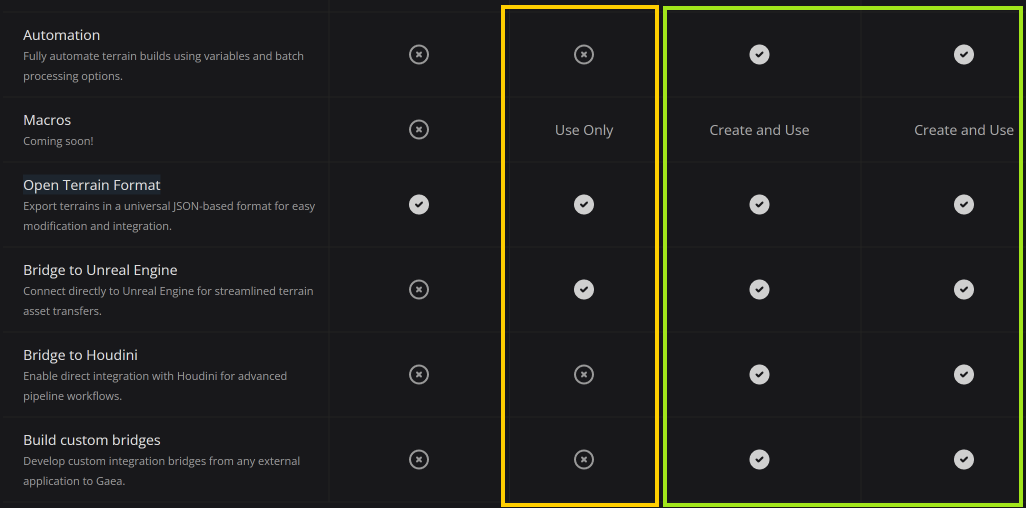
the SDK — and therefore a Professional license?
If any of these lands on “no”, I’d rather find out now and design around it than discover
it in September.
Thanks for the work on 3.0 — the versioning and Build Stack features look like exactly
what a reproducible pipeline needs.