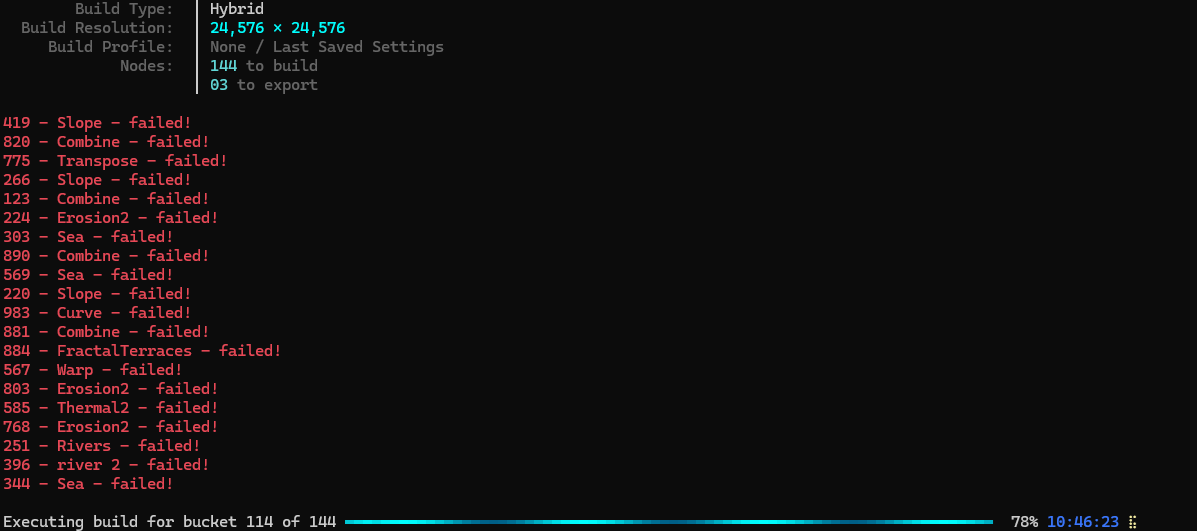
after 10 hours and 114 buckets built, all the nodes on my export just start failing. I have a 9950x3d, 128GB RAM and plenty of storage. there were no errors until this point.
Typically your log will tell you but it’s always worth testing smaller workflows as well so you can quickly check for any graph errors too.
Can you please run the Gaea diagnostics and share the diagnostic code it generates? It will help us analyze the issue you are facing. If possible can you share the . terrain file too?
no log because I didn’t let it finish and I deleted the buckets. I’ve exported this map in 16k and other maps in 24k and both have been fine
diagnostic code: ADD-20260409
crowmire 4.terrain (379.6 KB)
Thank you for the diagnostic log. Logs indicate that the build failed because there was not enough space on the disk.
Huh. There’s several TB of space on the drive it’s exporting to. Are export buckets stored in cache instead because I have that on a different drive.
All data is preset so essentially yes. Builds like that can be massive.
I cleared up some space, about 1.9TB. Tried again and it just closed out before finishing. It got to 75 out of 144 and the file was about 500GB. It doesn’t say why it crashed on the log
Does your really big drive have a page file? Might help.
just checked, it doesn’t.
I’ll keep Parvez’ response as the main solution to this.
But just to highlight when you’re building to export each bucket. It’s build data - depending on the config can be just export files or other files like caches and .BuildArtifacts these are all used to build/save final export files.
Superficially you may instinctively just think it’s similar to just saving a file.
But where it’s failing for you is building the data to be able to create the exported files.
It’s 3am for me right now but I’ll use your supplied files to illustrate it when I’m more conscious, hopefully that’ll help you.
I’m not too familiar with the build artifact/caching process under the hood, so anyone correct me if I’m mistaken.
As you have plenty of hard drive space, you’re running out of working memory, not storage. I could see a large graph of that resolution needing well over 128GB. You’re probably hitting that limit, then it starts writing to the page file on your OS drive until it completely fills up, slows down exponentially trying to juggle a tiny amount of memory, eventually crashing.
Try adding a page file and set it to automatic size. It’s quick and easy to setup. Don’t edit the one on your C drive.
I don’t think it’s running out of memory. I mean I wasn’t looking around the time it crashed but it generally hangs at around 50%. There were no other signs of high memory usage either, no hang ups, no stuttering or anything. Should I just switch to the fast setting on the hybrid build to see if it works that way?
Were you looking at Task Manager or Resource Monitor? Task manager doesn’t show all memory allocated like you would expect for some reason. Anything is worth a try, but I don’t think that setting is the make or break.
Are you exporting tiles or a single image?
Just task manager so that could explain it. Single image, which yeah is obviously much more resource intensive. I could possibly try tiled images but idk how it will work out with the software I’m using them for.
You’ll want to just look at your .BuildArtifacts files sizes for a single bucket.
If you’re saving this to a different drive you can update it.
You have 3 outputs so you’ll have 3 sets of artefact data data but they can contain the whole chain of nodes, more complex graphs more data.
There is a purge option too IIRC I’ll have to dig in again tomorrow for the precise information
and for example a single E2 node with all 4 outputs enabled in your same hybrid build set up should be just under 10 GB of 32bit data.y
If you added a primitive prior to that and baked it you should have another baked folder with that data it in too.
Where all these files live depend on your configured paths and often where the . terrain file is saved too.
yeah I found where the .buildartifacts save to. I deleted them and a bunch of other older exports to free up 1.9TB and the second export just closed out after around 50% with still plenty of storage left.
Okay then. That’s worth sending a diag code if you can’t find the log that says why
Thanks for the update. Can you please run the Gaea diagnostics again and send me the diagnostic code? This will give me the latest logs to investigate.