Hello friends! I’m having trouble exporting UDIMs from Gaea 2 Pro to Blender. I searched on Discord but couldn’t find a solution that worked for me. My tiles are in the wrong order when imported into Blender. Maybe I’m doing something wrong when exporting… Is there a tutorial showing how to do this correctly? I’ve searched a lot and haven’t been able to fix my problem. This is frustrating me.
IIRC UDIM logic in Blender is usually from bottom left
1001= bottom-left tile1002= tile to the right1011= tile directly above1001
If that isn’t what’s happening you could try flipping the Y axis on build exports
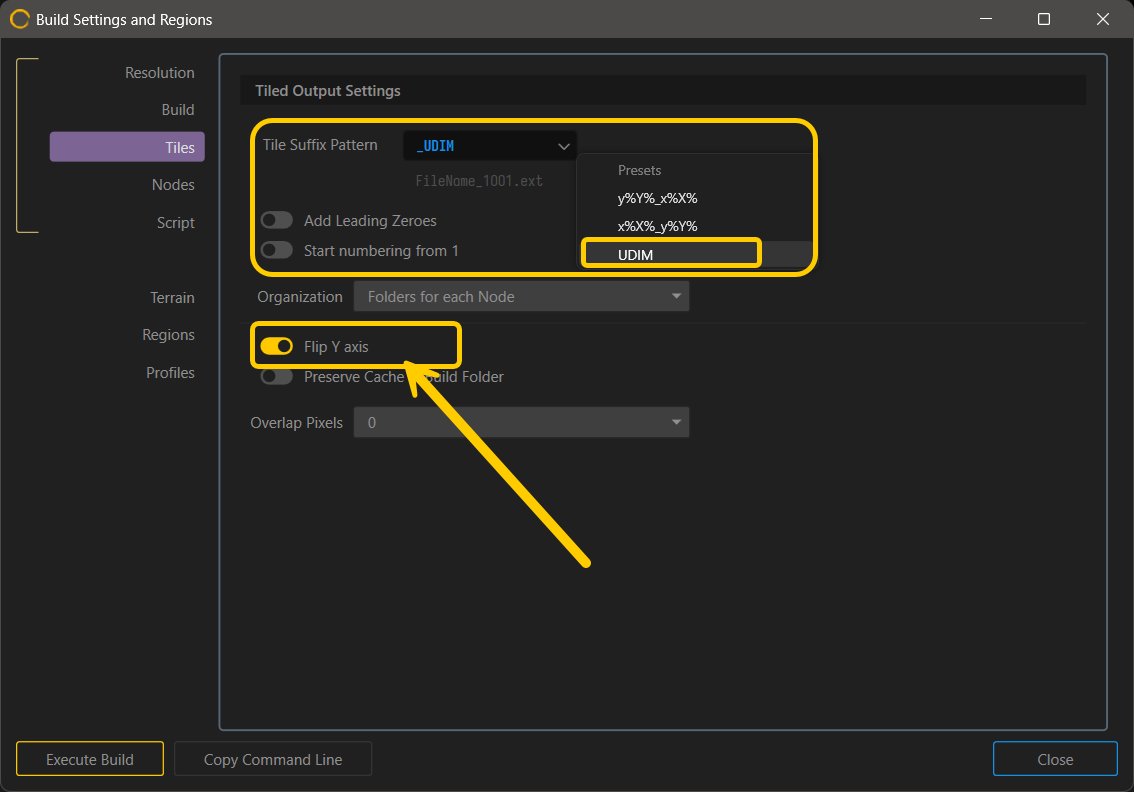
I see that there may be a bug worth reporting for UDIM exports ( maybe more) tht flip Y here doesn’t work.
In that case my advice would to run a post script to configure files after it is done.
or use this method if you dont want to make your own.